OpenClaw for Developers
Stop Debugging in the Dark
You love OpenClaw's power. You hate troubleshooting black-box agent failures.
CatsAndClaws gives you X-ray vision into your AI agents.
The Problem with CLI-Only OpenClaw
$ openclaw run agent
[LOG] Starting agent...
[LOG] Connecting to gateway...
[ERROR] Something went wrong
Which agent? What task? Where's the context?
When you're running multiple agents across different sessions, the terminal becomes a mess of interleaved logs. Debugging means:
- Grepping through thousands of lines
- Losing context when terminals scroll
- No visibility into what other agents are doing
- Impossible to share status with your team
The Developer-Friendly Solution
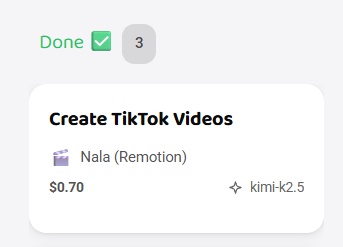
Visual Kanban for Agent Tasks
See every task your agents are working on:
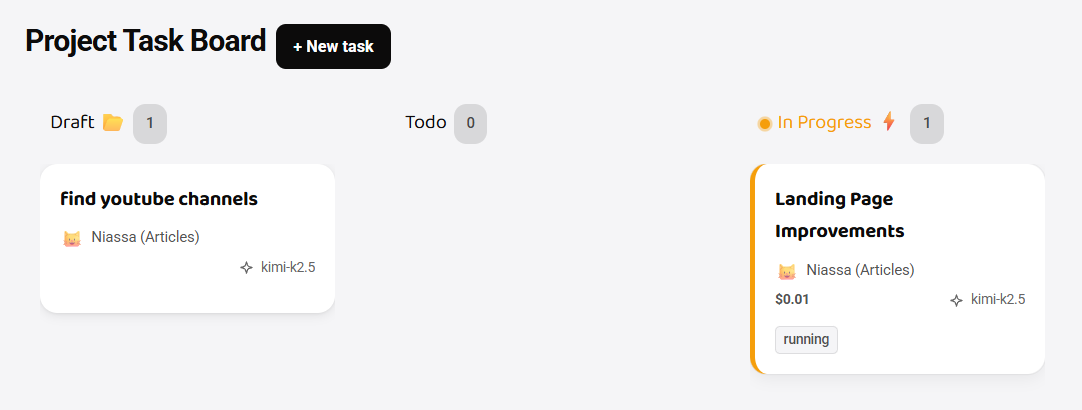
- Queued: Tasks waiting to start
- In Progress: Active agent work
- Review: Completed tasks needing your eyes
- Done: Finished and logged
Drag and drop to reprioritize. Click any card for full context.
Per-Task Log Streams
Instead of one giant log file, get isolated streams for each task:
Task: "Generate SEO report for Q1"
├─ 09:23:14 | Started research phase
├─ 09:23:45 | Found 15 competitor pages
├─ 09:24:12 | Analyzing keyword density...
├─ 09:25:01 | ⚠️  Fallback: GPT-4 → Claude (rate limit)
└─ 09:26:30 | ✅ Report generated (view)
No more grepping. No more context switching.
Real-Time Cost Tracking
See exactly what each agent costs:
| Agent | Model | Tokens | Cost | Status |
|---|---|---|---|---|
| Researcher | GPT-4 | 45K | $1.35 | ✅ Done |
| Writer | Claude 3.5 | 23K | $0.69 | 🔄 Active |
| Coder | Gemini Pro | 12K | $0.18 | ⏳ Queued |
Total session cost: $2.22 (Track it, budget it, optimize it.)
Built for Dev Teams
Multiplayer Mode
Your entire team shares one AI office:
- Assign tasks to specific agents
- Share logs with one click
- Comment on outputs (like GitHub PRs)
- Track who's running what
No more "hey, is anyone using the GPT-4 agent right now?"
Persistent Sessions
Close your laptop. Open it later. Your agents keep running.
Unlike local OpenClaw that stops when you close the terminal, CatsAndClaws runs in the cloud:
┌─────────────────────────────────────┐
│  Session: "Q1 Content Pipeline"     │
│  Status: 🟢 Running (3 days)        │
│                                     │
│  Agents: 5 active                   │
│  Tasks completed: 47                │
│  Est. cost: $18.42                  │
└─────────────────────────────────────┘
Git Integration
Connect your repos. Let agents:
- Review PRs automatically
- Generate commit messages
- Update documentation
- Create issues from errors
How It Works
1. Connect Your Gateway (or Use Ours)
Already running OpenClaw? Point us to your gateway.
New to OpenClaw? We spin up a managed instance in 60 seconds.
2. Invite Your Team
Invite link: catsandclaws.com/join/acme-corp
Seats: 5 developers
Role: Admin
3. Start Hiring Agents
Browse the marketplace:
- 🔍 Research Agent - Data gathering, analysis
- ✍️ Writer Agent - Content creation, documentation
- 💻 Dev Agent - Code review, bug fixes
- 🎨 Design Agent - Image generation, UI feedback
Click "Hire." Agent is live in 10 seconds.
4. Monitor Everything
Dashboard shows:
- All active agents
- Real-time logs
- Cost breakdown
- Team activity
- System health
Comparison: CLI vs. CatsAndClaws
| Feature | OpenClaw CLI | CatsAndClaws |
|---|---|---|
| Setup time | 2-4 hours | 60 seconds |
| Visual logs | ❌ Terminal only | ✅ Kanban + streams |
| Team sharing | ❌ SSH keys | ✅ Invite links |
| Cost tracking | ❌ Manual | ✅ Real-time |
| Persistent | ❌ Local only | ✅ Cloud always-on |
| Model fallback | ⚠️ Invisible | ✅ Visual alerts |
| Mobile access | ❌ | ✅ Responsive app |
Developer FAQ
Do I lose control of my OpenClaw instance?
No. If you already run OpenClaw, we connect to your gateway. You keep full control. We just add the visual layer.
Can I still use the CLI?
Absolutely. CatsAndClaws complements the CLI—you can use both interchangeably.
What about my custom skills?
Upload them to your dashboard. They're available to your entire team instantly.
Is my code/data safe?
We use isolated containers. Your data never touches other tenants. Enterprise plans include VPC isolation.
How much does it cost?
- Solo: $29/mo (platform + pay-as-you-go AI)
- Team: $99/mo (includes $50 AI credits, 5 seats)
Compare to: Managing your own servers + API keys + debugging time.
What Developers Are Saying
"Before CatsAndClaws, debugging agents meant scrolling through tmux panes for 20 minutes. Now I see everything in one view. Game changer."
"We have 5 engineers using the same OpenClaw instance. Without a dashboard, we'd be stepping on each other constantly."
"The cost tracking alone is worth it. Finally know which agents are burning through our API budget."
Get Started
Option 1: Connect Existing OpenClaw (2 min)
Already have OpenClaw running? Just add your gateway URL.
Option 2: Managed Instance (60 sec)
We'll spin up a cloud-hosted OpenClaw with everything pre-configured.
Related Resources
- OpenClaw GUI vs. CLI: Full Comparison
- How to Run OpenClaw Without API Keys
- AI Agent Orchestration Guide
Stop fighting your tools. Start building with them.